Your customer sees their design on their own skin before the appointment.
Envis is the try-on for your studio. You upload the design and send a link. Your customer points their phone camera at their arm and sees the design in the spot where it is to be tattooed. If they want a change, they write it to you right below the design and your new version is on their phone a second later.

The film shows a rose drawing itself onto a forearm. The placement is settled before you apply the stencil: your customer sees size and position on their own arm. With two fingers they pull the design bigger, slide it and rotate it. Their snapshot and their messages show up in your panel the same moment. When you upload a new version, the image on their phone changes in the same second. One link and a browser are enough, with no app and no account.
How a try-on works
Upload the design
You upload a photo of the stencil or the file from Procreate. Envis cuts the design out of the paper white, you enter the width in centimetres.
Send the link and the QR code
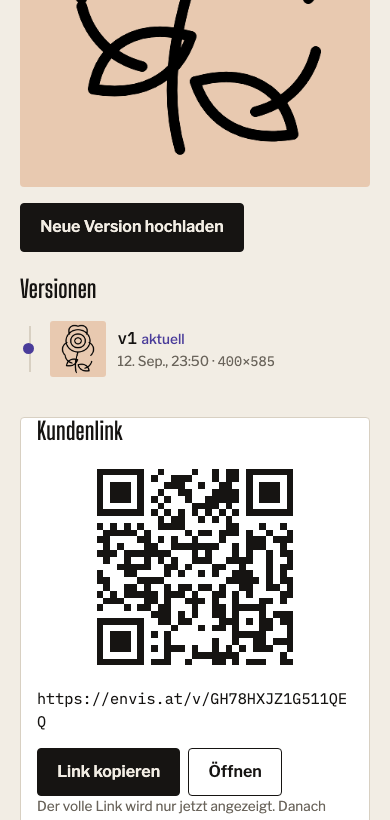
Every project gets its own link and a QR code. The customer scans it at the counter or gets the link on WhatsApp.
The customer points the camera at the spot
The design lies on the skin and moves along when they turn their arm. With two fingers they slide it into place, rotate it and pull it bigger.
You discuss the design while they see it on their arm
Their snapshot arrives in the project along with the placement they chose. A tap on "bigger" or a line like "closer to the wrist" shows up in your panel the same moment.
Your new version is on their phone at once
You shrink the rose and upload version 2. On your customer's phone the image changes in the same second and they look at the new version on their arm right away. Every version stays saved, in case you both decide on the first one in the end.
%20scale(0.72)%20translate(-400%20-430)%22%3E%3Cpath%20d%3D%22M400%20440C396%20540%20380%20650%20392%20770%22%2F%3E%3Cpath%20d%3D%22M396%20590C329.3%20624.2%20248.2%20564.6%20234.2%20511.1C306.4%20486.2%20387.3%20525.7%20396%20590Z%22%20fill%3D%22%23e8c9b0%22%2F%3E%3Cpath%20d%3D%22M396%20590L269.8%20528.5%22%2F%3E%3Cpath%20d%3D%22M388%20668C398.8%20598.8%20488.3%20570.3%20536.3%20589.1C515.5%20657.3%20441.3%20696.7%20388%20668Z%22%20fill%3D%22%23e8c9b0%22%2F%3E%3Cpath%20d%3D%22M388%20668L503.7%20606.5%22%2F%3E%3Cpath%20d%3D%22M390%20716C340%20716%20300%20690%20298%20650C297%20616%20340%20610%20344%20642C346%20660%20322%20664%20320%20650%22%2F%3E%3Cpath%20d%3D%22M400%20386C445.3%20401.9%20481.4%20476.6%20479.5%20513.2C432.7%20489.4%20393%20425.7%20400%20386Z%22%20fill%3D%22%23e8c9b0%22%2F%3E%3Cpath%20d%3D%22M400%20386C405.6%20433.7%20354.2%20498.9%20320.5%20513.2C321.5%20460.7%20361.2%20397.1%20400%20386Z%22%20fill%3D%22%23e8c9b0%22%2F%3E%3Cpath%20d%3D%22M400%20290C250%20228.8%20313%20114.6%20400%2086C487%20114.6%20550%20228.8%20400%20290Z%22%20fill%3D%22%23e8c9b0%22%2F%3E%3Cpath%20d%3D%22M400%20290C411.9%20128.4%20540%20153%20594%20227C593.7%20318.5%20504.6%20413.7%20400%20290Z%22%20fill%3D%22%23e8c9b0%22%2F%3E%3Cpath%20d%3D%22M400%20290C295.4%20413.7%20206.3%20318.5%20206%20227C260%20153%20388.1%20128.4%20400%20290Z%22%20fill%3D%22%23e8c9b0%22%2F%3E%3Cpath%20d%3D%22M400%20290C557.3%20251.3%20573.5%20380.8%20519.9%20455C432.7%20483.1%20314.6%20427.7%20400%20290Z%22%20fill%3D%22%23e8c9b0%22%2F%3E%3Cpath%20d%3D%22M400%20290C485.4%20427.7%20367.3%20483.1%20280.1%20455C226.5%20380.8%20242.7%20251.3%20400%20290Z%22%20fill%3D%22%23e8c9b0%22%2F%3E%3Cpath%20d%3D%22M400%20290C338.4%20191.1%20423.1%20151.6%20485.8%20171.9C524.5%20225.2%20513.1%20318%20400%20290Z%22%20fill%3D%22%23e8c9b0%22%2F%3E%3Cpath%20d%3D%22M400%20290C286.9%20318%20275.5%20225.2%20314.2%20171.9C376.9%20151.6%20461.6%20191.1%20400%20290Z%22%20fill%3D%22%23e8c9b0%22%2F%3E%3Cpath%20d%3D%22M400%20290C475%20200.8%20538.8%20269.2%20538.9%20335.1C500.1%20388.4%20408.3%20406.2%20400%20290Z%22%20fill%3D%22%23e8c9b0%22%2F%3E%3Cpath%20d%3D%22M400%20290C391.7%20406.2%20299.9%20388.4%20261.1%20335.1C261.2%20269.2%20325%20200.8%20400%20290Z%22%20fill%3D%22%23e8c9b0%22%2F%3E%3Cpath%20d%3D%22M400%20290C508%20333.8%20462.6%20415.6%20400%20436C337.4%20415.6%20292%20333.8%20400%20290Z%22%20fill%3D%22%23e8c9b0%22%2F%3E%3Cpath%20d%3D%22M400%20290C329.7%20245.6%20374.1%20194.2%20420%20196.1C462.6%20213%20482.3%20278%20400%20290Z%22%20fill%3D%22%23e8c9b0%22%2F%3E%3Cpath%20d%3D%22M400%20290C473.6%20251.3%20495.9%20315.5%20471.3%20354.2C435.4%20382.7%20369.2%20367.2%20400%20290Z%22%20fill%3D%22%23e8c9b0%22%2F%3E%3Cpath%20d%3D%22M400%20290C396.7%20373.1%20330%20360.3%20308.7%20319.7C302%20274.3%20348.5%20224.7%20400%20290Z%22%20fill%3D%22%23e8c9b0%22%2F%3E%3Cpath%20d%3D%22M370%20296C366%20256%20430%20252%20432%20292C434%20326%20374%20328%20370%20296Z%22%20fill%3D%22%23e8c9b0%22%2F%3E%3Cpath%20d%3D%22M414%20278C398%20268%20384%20284%20392%20298C398%20308%20412%20302%20410%20292%22%2F%3E%3C%2Fg%3E%3Cpath%20stroke-width%3D%2224%22%20stroke-linecap%3D%22butt%22%20stroke-linejoin%3D%22miter%22%20d%3D%22M311%2050H261V120H311M261%2085H301M337%2050V120H387M413%2050V120H463M489%20120L514%2050L539%20120M499%2096H529%22%2F%3E%3C%2Fsvg%3E) v3current Lettering in block letters, as discussed
v3current Lettering in block letters, as discussed%20scale(0.72)%20translate(-400%20-430)%22%3E%3Cpath%20d%3D%22M400%20440C396%20540%20380%20650%20392%20770%22%2F%3E%3Cpath%20d%3D%22M396%20590C329.3%20624.2%20248.2%20564.6%20234.2%20511.1C306.4%20486.2%20387.3%20525.7%20396%20590Z%22%20fill%3D%22%23e8c9b0%22%2F%3E%3Cpath%20d%3D%22M396%20590L269.8%20528.5%22%2F%3E%3Cpath%20d%3D%22M388%20668C398.8%20598.8%20488.3%20570.3%20536.3%20589.1C515.5%20657.3%20441.3%20696.7%20388%20668Z%22%20fill%3D%22%23e8c9b0%22%2F%3E%3Cpath%20d%3D%22M388%20668L503.7%20606.5%22%2F%3E%3Cpath%20d%3D%22M390%20716C340%20716%20300%20690%20298%20650C297%20616%20340%20610%20344%20642C346%20660%20322%20664%20320%20650%22%2F%3E%3Cpath%20d%3D%22M400%20386C445.3%20401.9%20481.4%20476.6%20479.5%20513.2C432.7%20489.4%20393%20425.7%20400%20386Z%22%20fill%3D%22%23e8c9b0%22%2F%3E%3Cpath%20d%3D%22M400%20386C405.6%20433.7%20354.2%20498.9%20320.5%20513.2C321.5%20460.7%20361.2%20397.1%20400%20386Z%22%20fill%3D%22%23e8c9b0%22%2F%3E%3Cpath%20d%3D%22M400%20290C250%20228.8%20313%20114.6%20400%2086C487%20114.6%20550%20228.8%20400%20290Z%22%20fill%3D%22%23e8c9b0%22%2F%3E%3Cpath%20d%3D%22M400%20290C411.9%20128.4%20540%20153%20594%20227C593.7%20318.5%20504.6%20413.7%20400%20290Z%22%20fill%3D%22%23e8c9b0%22%2F%3E%3Cpath%20d%3D%22M400%20290C295.4%20413.7%20206.3%20318.5%20206%20227C260%20153%20388.1%20128.4%20400%20290Z%22%20fill%3D%22%23e8c9b0%22%2F%3E%3Cpath%20d%3D%22M400%20290C557.3%20251.3%20573.5%20380.8%20519.9%20455C432.7%20483.1%20314.6%20427.7%20400%20290Z%22%20fill%3D%22%23e8c9b0%22%2F%3E%3Cpath%20d%3D%22M400%20290C485.4%20427.7%20367.3%20483.1%20280.1%20455C226.5%20380.8%20242.7%20251.3%20400%20290Z%22%20fill%3D%22%23e8c9b0%22%2F%3E%3Cpath%20d%3D%22M400%20290C338.4%20191.1%20423.1%20151.6%20485.8%20171.9C524.5%20225.2%20513.1%20318%20400%20290Z%22%20fill%3D%22%23e8c9b0%22%2F%3E%3Cpath%20d%3D%22M400%20290C286.9%20318%20275.5%20225.2%20314.2%20171.9C376.9%20151.6%20461.6%20191.1%20400%20290Z%22%20fill%3D%22%23e8c9b0%22%2F%3E%3Cpath%20d%3D%22M400%20290C475%20200.8%20538.8%20269.2%20538.9%20335.1C500.1%20388.4%20408.3%20406.2%20400%20290Z%22%20fill%3D%22%23e8c9b0%22%2F%3E%3Cpath%20d%3D%22M400%20290C391.7%20406.2%20299.9%20388.4%20261.1%20335.1C261.2%20269.2%20325%20200.8%20400%20290Z%22%20fill%3D%22%23e8c9b0%22%2F%3E%3Cpath%20d%3D%22M400%20290C508%20333.8%20462.6%20415.6%20400%20436C337.4%20415.6%20292%20333.8%20400%20290Z%22%20fill%3D%22%23e8c9b0%22%2F%3E%3Cpath%20d%3D%22M400%20290C329.7%20245.6%20374.1%20194.2%20420%20196.1C462.6%20213%20482.3%20278%20400%20290Z%22%20fill%3D%22%23e8c9b0%22%2F%3E%3Cpath%20d%3D%22M400%20290C473.6%20251.3%20495.9%20315.5%20471.3%20354.2C435.4%20382.7%20369.2%20367.2%20400%20290Z%22%20fill%3D%22%23e8c9b0%22%2F%3E%3Cpath%20d%3D%22M400%20290C396.7%20373.1%20330%20360.3%20308.7%20319.7C302%20274.3%20348.5%20224.7%20400%20290Z%22%20fill%3D%22%23e8c9b0%22%2F%3E%3Cpath%20d%3D%22M370%20296C366%20256%20430%20252%20432%20292C434%20326%20374%20328%20370%20296Z%22%20fill%3D%22%23e8c9b0%22%2F%3E%3Cpath%20d%3D%22M414%20278C398%20268%20384%20284%20392%20298C398%20308%20412%20302%20410%20292%22%2F%3E%3C%2Fg%3E%3C%2Fsvg%3E) v2 Rose smaller, vine further in
v2 Rose smaller, vine further in%20scale(1)%20translate(-400%20-430)%22%3E%3Cpath%20d%3D%22M400%20440C396%20540%20380%20650%20392%20770%22%2F%3E%3Cpath%20d%3D%22M396%20590C329.3%20624.2%20248.2%20564.6%20234.2%20511.1C306.4%20486.2%20387.3%20525.7%20396%20590Z%22%20fill%3D%22%23e8c9b0%22%2F%3E%3Cpath%20d%3D%22M396%20590L269.8%20528.5%22%2F%3E%3Cpath%20d%3D%22M388%20668C398.8%20598.8%20488.3%20570.3%20536.3%20589.1C515.5%20657.3%20441.3%20696.7%20388%20668Z%22%20fill%3D%22%23e8c9b0%22%2F%3E%3Cpath%20d%3D%22M388%20668L503.7%20606.5%22%2F%3E%3Cpath%20d%3D%22M390%20716C340%20716%20300%20690%20298%20650C297%20616%20340%20610%20344%20642C346%20660%20322%20664%20320%20650%22%2F%3E%3Cpath%20d%3D%22M400%20386C445.3%20401.9%20481.4%20476.6%20479.5%20513.2C432.7%20489.4%20393%20425.7%20400%20386Z%22%20fill%3D%22%23e8c9b0%22%2F%3E%3Cpath%20d%3D%22M400%20386C405.6%20433.7%20354.2%20498.9%20320.5%20513.2C321.5%20460.7%20361.2%20397.1%20400%20386Z%22%20fill%3D%22%23e8c9b0%22%2F%3E%3Cpath%20d%3D%22M400%20290C250%20228.8%20313%20114.6%20400%2086C487%20114.6%20550%20228.8%20400%20290Z%22%20fill%3D%22%23e8c9b0%22%2F%3E%3Cpath%20d%3D%22M400%20290C411.9%20128.4%20540%20153%20594%20227C593.7%20318.5%20504.6%20413.7%20400%20290Z%22%20fill%3D%22%23e8c9b0%22%2F%3E%3Cpath%20d%3D%22M400%20290C295.4%20413.7%20206.3%20318.5%20206%20227C260%20153%20388.1%20128.4%20400%20290Z%22%20fill%3D%22%23e8c9b0%22%2F%3E%3Cpath%20d%3D%22M400%20290C557.3%20251.3%20573.5%20380.8%20519.9%20455C432.7%20483.1%20314.6%20427.7%20400%20290Z%22%20fill%3D%22%23e8c9b0%22%2F%3E%3Cpath%20d%3D%22M400%20290C485.4%20427.7%20367.3%20483.1%20280.1%20455C226.5%20380.8%20242.7%20251.3%20400%20290Z%22%20fill%3D%22%23e8c9b0%22%2F%3E%3Cpath%20d%3D%22M400%20290C338.4%20191.1%20423.1%20151.6%20485.8%20171.9C524.5%20225.2%20513.1%20318%20400%20290Z%22%20fill%3D%22%23e8c9b0%22%2F%3E%3Cpath%20d%3D%22M400%20290C286.9%20318%20275.5%20225.2%20314.2%20171.9C376.9%20151.6%20461.6%20191.1%20400%20290Z%22%20fill%3D%22%23e8c9b0%22%2F%3E%3Cpath%20d%3D%22M400%20290C475%20200.8%20538.8%20269.2%20538.9%20335.1C500.1%20388.4%20408.3%20406.2%20400%20290Z%22%20fill%3D%22%23e8c9b0%22%2F%3E%3Cpath%20d%3D%22M400%20290C391.7%20406.2%20299.9%20388.4%20261.1%20335.1C261.2%20269.2%20325%20200.8%20400%20290Z%22%20fill%3D%22%23e8c9b0%22%2F%3E%3Cpath%20d%3D%22M400%20290C508%20333.8%20462.6%20415.6%20400%20436C337.4%20415.6%20292%20333.8%20400%20290Z%22%20fill%3D%22%23e8c9b0%22%2F%3E%3Cpath%20d%3D%22M400%20290C329.7%20245.6%20374.1%20194.2%20420%20196.1C462.6%20213%20482.3%20278%20400%20290Z%22%20fill%3D%22%23e8c9b0%22%2F%3E%3Cpath%20d%3D%22M400%20290C473.6%20251.3%20495.9%20315.5%20471.3%20354.2C435.4%20382.7%20369.2%20367.2%20400%20290Z%22%20fill%3D%22%23e8c9b0%22%2F%3E%3Cpath%20d%3D%22M400%20290C396.7%20373.1%20330%20360.3%20308.7%20319.7C302%20274.3%20348.5%20224.7%20400%20290Z%22%20fill%3D%22%23e8c9b0%22%2F%3E%3Cpath%20d%3D%22M370%20296C366%20256%20430%20252%20432%20292C434%20326%20374%20328%20370%20296Z%22%20fill%3D%22%23e8c9b0%22%2F%3E%3Cpath%20d%3D%22M414%20278C398%20268%20384%20284%20392%20298C398%20308%20412%20302%20410%20292%22%2F%3E%3C%2Fg%3E%3C%2Fsvg%3E) v1 First draft after the consultation
v1 First draft after the consultation
What you see in the studio
You have the same project in front of you, with every version, every snapshot from the customer, the link and the QR code.

Which studios Envis is made for
For studios where placement gets decided at the appointment. The customer sees size and position on their own arm before you apply the stencil.
You still apply the stencil yourself and where it sits in the end is your decision. By then your customer has already seen the design on their arm and you are both talking about the same picture.
Frequent questions from studios
Does the customer need an app?
A browser is enough: Safari from iOS 16.4 or Chrome on Android. Some apps give their built-in browser no camera, Instagram on Android for example. The page then tells the customer how to open the link in Safari or Chrome.
Which body parts does the camera recognise?
The camera recognises arms and hands, legs and feet. It also covers shoulders and neck, chest and belly as well as ribs and back. It sees the hand and lower arm up close. For every other spot it needs the head and shoulders in the frame. A second person holds the phone for that. The back and ribs are hard to film yourself. For those spots the customer chooses a photo of the spot and slides the design into place on it. When the spot leaves the frame, the page reports it.
How accurate is the size on the arm?
The page measures the spot in the picture and works with the proportions of an average body. You tattoo to the size you set yourself. The camera shows proportion and position.
Where are the images stored?
Designs and snapshots are stored with Cloudflare in the Western Europe region and can only be reached through a signed link that expires. The camera stream stays on the phone. The only thing uploaded is the snapshot the customer sends themselves.
Can I take a link back?
Yes, any time. The link stops working the second you tap revoke, including on a phone that has the page open right then. You can also give links an expiry from the start.
Can my artists use Envis too?
Yes. The owner invites the artists by email in the settings. Each artist signs in with their own address and works in the studio's projects.
Does Envis work on the iPhone?
The customer page needs Safari from iOS 16.4. Before loading the page checks whether the browser can show the camera view and the photo mode. If it cannot, the page reports it. On devices from before about 2019 the preview is slow.